

There’s no denying that Microsoft Flight Simulator is visually stunning. From the volumetric clouds to streamed high resolution orthographic imagery wrapped up in a new DX11 based graphics engine, MSFS has visuals that push the boundaries of what we’ve seen in flight simulation. Are those impressive visuals going to need a monster PC to make it work? Well… we know the system specifications that Asobo Studios is targeting and it is cause for some optimism.
Find out if you can run MSFS

Although we’re used to sims like FSX, P3D and X-Plane 11 running at some decidedly average frame rates, I don’t think this necessarily needs to be the case. FSX and P3D trace their lineage back to a different era of hardware and graphics support while X-Plane has until recently been using the much older OpenGL platform for its graphics engine – with notable gains being made with their switch to Vulkan in the beta version of 11.50.
Asobo Studios and Microsoft have been hard at work taking what code they wanted from FSX but also writing a whole new graphics system for MSFS and I suspect that is going to pay off big time with some alpha testers reporting that the latest patches are running far smoother than other sims. Although these are anecdotal reports and should be treated with a dash of skepticism, it is good to know that a modern engine supporting all of the latest advancements can pump out some solid frame rates.
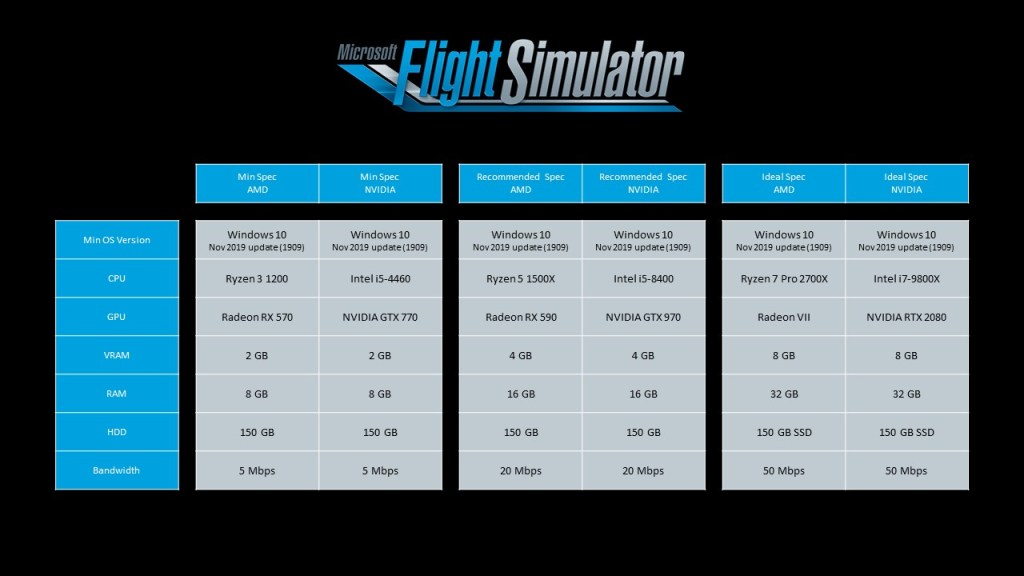
Here are the specs as they have just been released on the Flight Simulator website.
Doing a little analysis on what’s been released
Working our way down the specs sheet, Windows 10 is a surefire requirement for the new sim. If you’re a holdout for the newest OS from Microsoft, this may force you to upgrade although Windows 10 is hardly the bleeding edge having been out for nearly 5-years now.
Looking at CPU’s, it’s obvious that Flight Simulator will take as much CPU power as you can give it similar to every other sim on the market. What we don’t know is how much advantage more CPU cores will offer such as the 6 and 8 core options in the latest Intel Core i5, Core i7 and AMD Ryzen 5 and 7 series. Looking at the middle and low specs and we see some older hardware listed such as the Core i5 4460 which released in 2014. If your system is a little older this speaks to solid chances for being able to run the new sim in at least a basic capacity.
GPU’s make a big difference in the visuals department and the GTX 970 in the medium position suggests good things for visuals even if you haven’t dialed it up all the way on a 4K monitor. The 970 is bested by the more budget friendly GTX 1660 or RX 5700 these days. I will say, however, that their 4GB of VRAM probably is suggested when not using anti-aliasing which you do tend to need a fair bit of VRAM to do in a modern sim – in my experience anyways. Anything over 4GB is probably going to give good performance.
RAM for the sim plays out similarly to DCS World with 8GB being a minimum experience while 16GB works very well and 32GB is optimal. In the case of DCS World, 32GB is suggested for the most complex multiplayer scenarios and I’m willing to bet that may be the case here too.
Finally we have storage and bandwidth. At 150GB of storage required, Flight Simulator weighs in decidedly less than X-Plane 11 with some scenery packages installed. What we don’t know is how much storage you theoretically can devote to scenery that you’re flying over and how quick the streaming service is at bringing new textures in.
With the recommended 50Mbps service for network speeds, you can bet that this requirement is needed for the ultimate experience with minimal delay in bringing down new scenery. However, a slightly lower resolution experience is apparently possible and surely the slower speeds will do just fine except in the case of the slowest download speeds.
High end but not mind blowing
At the end of the day I look at the spec sheet and I see similar requirements that you need from other simulations. DCS World, X-Plane 11, IL-2, and the latest version of P3D (recently released) all take powerful systems to run optimally.
But that said you can get away with far less and still have nearly the entire experience and so these specs, while high end, don’t look like they are going to require you to immediately drop money on a new PC if you have something that can already handle the latest sims.





 Stormbirds
Leave a reply to Gretsch_Man Cancel reply