Third party DCS World developer Heatblur is known for their attention to detail when it comes to aircraft systems and we’re getting a taste of that with a new developer update released earlier today talking about the radar and terrain clearance mode for the DCS: A-6 Intruder. Let’s have a look!

Reading the terrain ahead
I’m taking it as a good sign that Heatblur are starting to talk about the systems of the DCS: A-6. In this first update of the year, we’re looking at some of the symbology and details behind the attack jet’s Terrain Clearance (TC) mode.

With TC mode selected, the pilots ADI displays a 53 degree horizontal and 26 degree vertical pictorial representation of terrain ahead. Here’s more detail from the update:

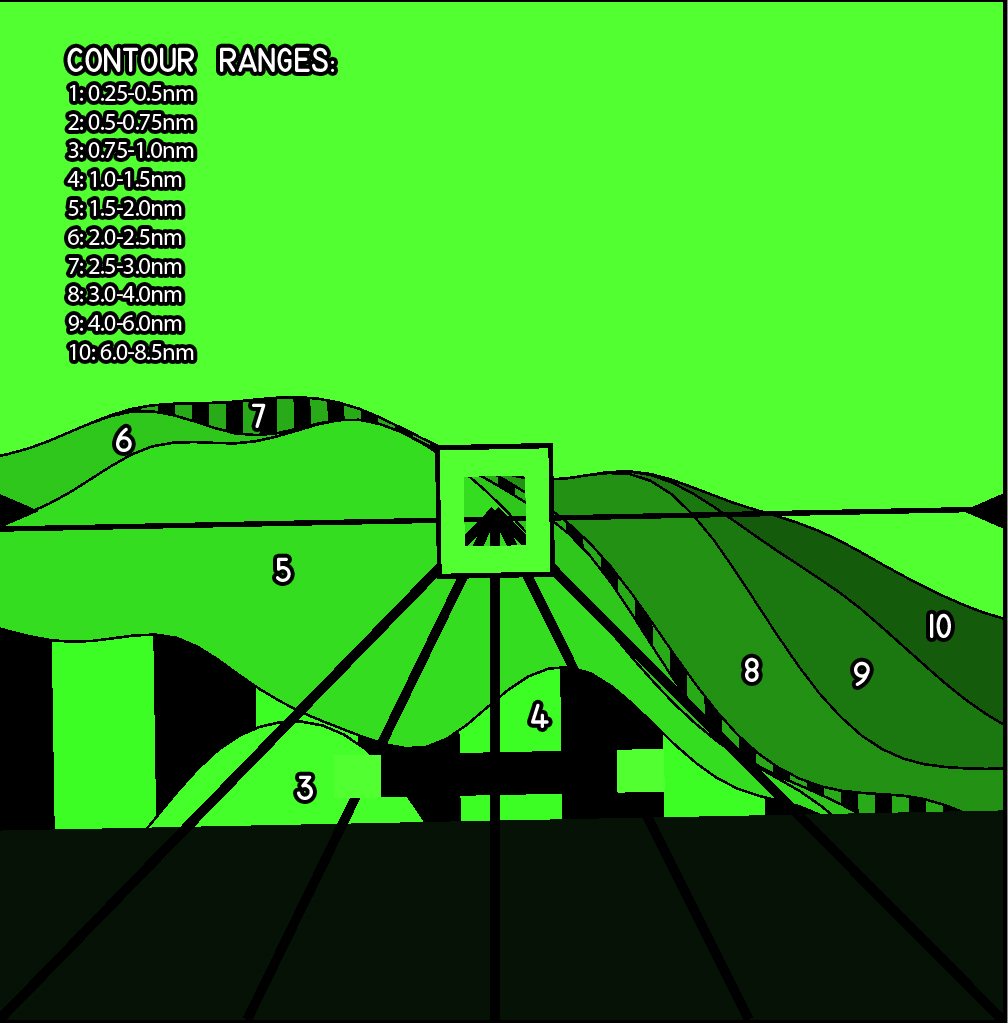
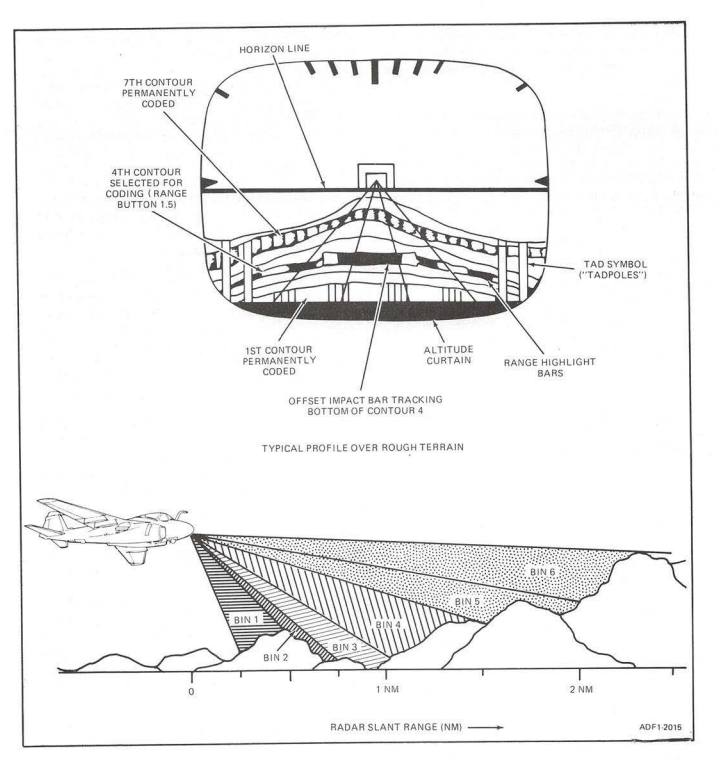
During normal flight, the Pilot’s ADI is almost identical to the similar display in the F-14 Tomcat, the VDI, however when TC mode is selected, it displays a 53° (horizontal) x 26° (vertical) pictorial representation of the terrain ahead of the aircraft based on the data supplied by the radar.

On the ADI we see the black Horizon Line and Fiducial Markers that help mark our pitch and bank attitude. In the center are the Steering Symbol and Flight Path Lines, currently locked to the aircraft heading. Behind this symbology are displayed ten discreet bands, each representing a range contour, from ~0.25nm out to 8.5nm. Bands 1 and 7 are permanently coded with range coding bars for identification, while bands 3-6 may be selected for coding – that is to display the vertical black bars – based on Pilot input. In the example below, band 4 is selected for coding by the Pilot.

The Pilot maintains clearance over the terrain by flying the aircraft so that the Offset Impact Bar (black and green, fixed near bottom of screen) is situated above one of the coded bands 3-6 – the selected band determines the clearance height and smoothness of the ride.

Heatblur remind us that what we’re seeing is still a work in progress. Some symbology needs to be added and tweaked.

The included images help give us an indication how things will work but the video presented to us on their Facebook page is even better at showing how the different bands rise and fall according to the terrain ahead.


7 responses to “Heatblur shows off work-in-progress radar and terrain clearance mode on DCS: A-6”

  1. From what I’ve understood, the A-6E Intruder will be Heatblur’s main focus for the forseable future. I think the fact that they are doing a highly realistic and highly detailed non-playable aircraft first is an interesting route to an eventual full fidelity playable Intruder. Do you suspect this will be a developmental journey most DCS third party developers will take eventually?

    Like

    1. The project Lancaster has already used this in the development of the WWII Lancaster Bomber. So maybe they are both on to something. For now, you can down load the Lancaster and use it in your missions or for some cinematic shots.

      Liked by 2 people

    2. I believe they had already mentioned in the past that it will may be or will be upgraded to a full module in the future.

      Liked by 1 person

      1. ShamrockOneFive Avatar
        ShamrockOneFive

        I think what PaperPilot is noting is the workflow of developing the aircraft’s exterior fully and making that available as an AI aircraft first.

        I don’t know if it offers any benefits for the module’s development. But it’s kind of neat to have it available as a kind of preview ahead of time.

        Liked by 1 person

  2. I can see an advantage to doing it “outside in” as many airplanes are made that way. It provides the “shell” to work from. For example if you already have a rudder created, you can test its functionality to the main control hub software immediately. It’s a “frame” to work on.

    Otherwise, like a real a/c you have to just sort of have pieces laying around the floor waiting for the structure to be done anyway. The “shell” gives you something to put the pieces on.

    Then linking those in a basic way for AI means you are through step 2 of project development.

    With an AI model, people get to see a “preview” of your product to build a customer base and show you have some skill getting through the first two steps of the project. It’s basically halfway done at the point you can make an AI model, so there’s a lot more faith in project progress having seen it.

    Liked by 1 person

    1. Good insights on this!

      Like

  3. […] of what we learned in today’s update is what we saw from Heatblur earlier in the week. You can read about that here. We did get a couple of new screenshots which is always […]

    Like

Leave a reply to timewind Cancel reply

Trending