
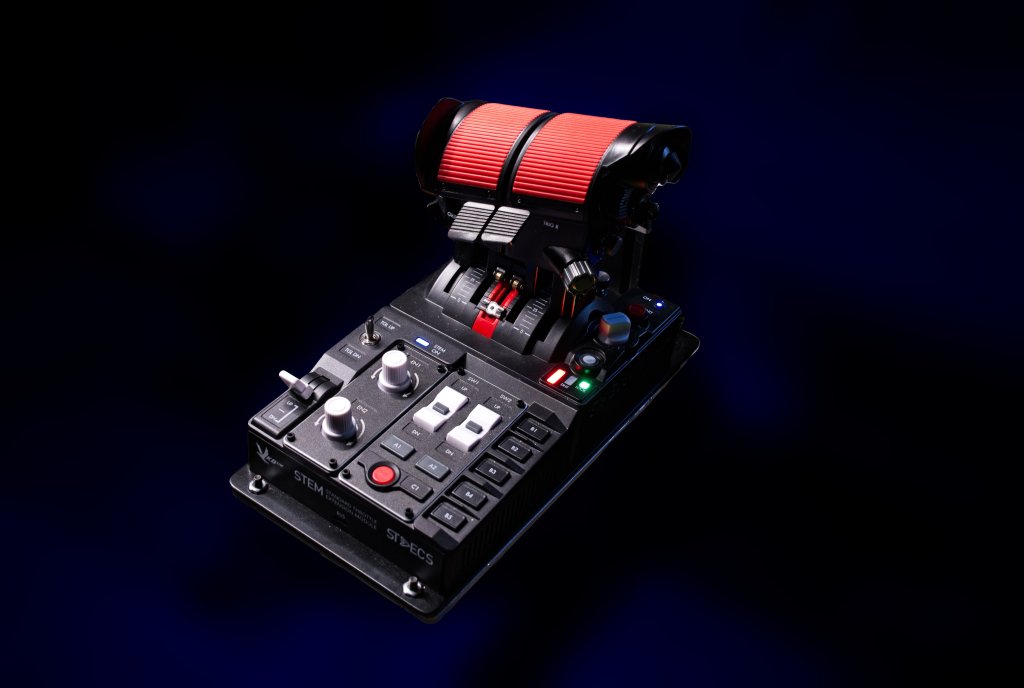
I’ve had the pleasure of testing out VKB’s STECS throttle system for the last several months and now I’m releasing part two of a three part review series. In this part, I’ll be talking setup, talking use cases, and attempting to answer your questions. I’ll be following up with a complete review with a closer look hardware itself and what it’s like to use over the long term. So, let’s have a closer look at the VKB STECS!
Disclaimer
VKB-Sim sent me the VKB STECS for review in exchange for a detailed series of reviews of the hardware. As always, I disclose when something has been sent to me for review. VKB have no editorial control (nor expressed any interest) over this review so these words are entirely my own.
VKB sent me their STECS Throttle System – Standard edition package for review. Three other models exist in various configurations.
Setting up the hardware and the software
Most of the STECS throttle came pre-assembled so I didn’t need to spent a lot of time hooking things up. It makes startup quick and easy which is good because I did find that their previous throttle quadrant system a bit finicky to setup from the start. No such problems here.
Once plugged in you need to then go to the VKB-Sim website and grab their software. For me and those of you in North America, you’ll want to visit the North American website and the STECS downloads page. For others, follow the links on the QR code in the box to get to the appropriate download location.
VKB’s software has evolved over the years and the latest, VKB Device Config v0.92.88 is more graphical and more friendly to use than it has been in the past. On the other side of the coin, just like its competitors software, there are a lot of features and sometimes things can get a little technical and confusing depending on how invested you are in changing the settings.
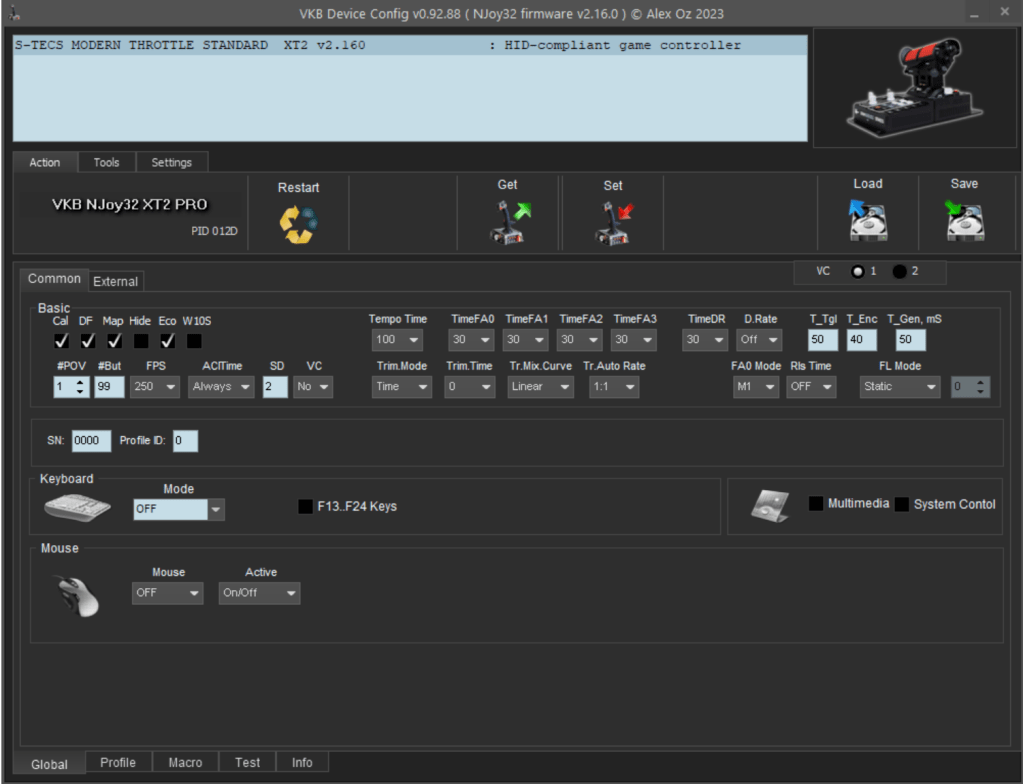
VKB have done a great job of producing a series of videos for each of their recent product releases that help you get started. The playlist of 8 videos, embedded below, starts from scratch and takes you through setup, configuration and customization.
Solid hardware, flexible uses
I’ve been flying with STECS for a few months already and in that time I’ve been flying a mix of jet fighters and airliners, bi-planes and warbirds and so this first impressions piece comes after many hours of flight time. Still, I don’t feel comfortable calling it a full review until I’ve tried everything and done as much as I can with the hardware. There’s more to come but until then, this is what my first experiences have been.
The construction of the unit itself is impressive. It is mostly plastic, but it remains the high-quality plastic that VKB uses throughout their hardware line-up. There’s no bending, flexing, or warping anywhere on the main unit or its buttons. There are levers, front and back, on the throttle itself that I worry are weak spots but so far its been no problem at all.
In action I’ve already had a good chance to tweak the throttle’s stiffness to my liking finding a sweet spot between precision placement and rapid action. In a GA or airliner you don’t often need to change all that quickly but in a jet fighter you can go from virtually nothing to maximum afterburner in a very short period of time and so balance is important. Precision here is as good as anything I’ve ever experienced and easily matches the VIRPIL MongoostT-50 – the leader in my throttle review experience. Even in VKB’s calibration tool you can see the numbers only jitter around a very small amount which speaks well to quality of the sensors. In practical use they are rock solid in any sim I’ve tried.

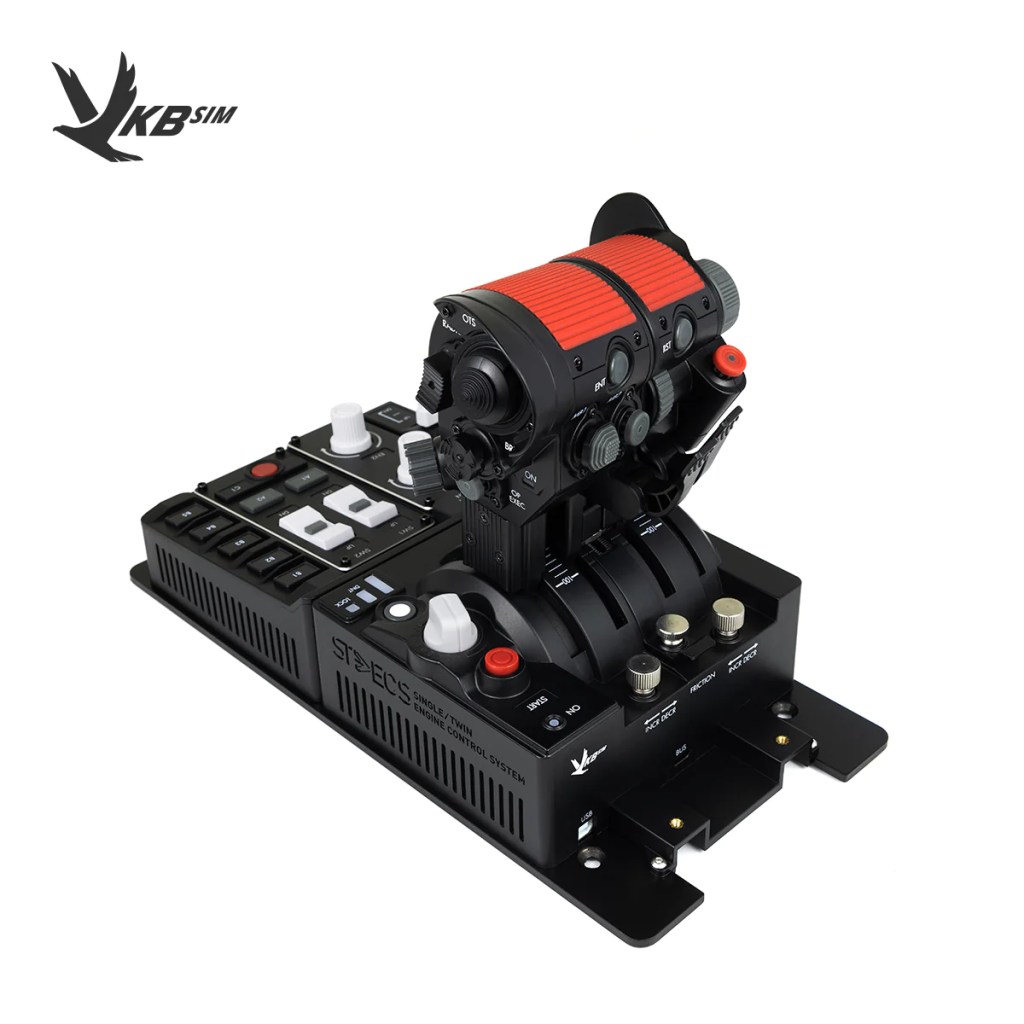

On the configuration I have, nearly all of the controls are thoughtfully configured. I like the start button, the mode dial, the B keys along the side, the white rocker switches (ideal for things like flaps up/down), the metal toggle switch (which I like to make a master arm switch) and the landing gear control which has three positions including a neutral.
The dials are also quite good and better here than on the VIRPIL MongoostT-50. They register multiple rapid inputs and queue them up in the hardware (something I’ve not seen before) so that you can easily dial in an altitude change or speed selection on autopilot or precisely adjust lighting or some other control. Of course an actual axis would be nicer but there are always concessions to price and practicality and so these are almost as good.
A few struggles
The thing that I’m missing right now, something that I’ve become accustomed to on VIRPIL’s MongoostT-50 CM3, is the analog control lever just to the right of the throttle. I’ve ended up using that control for everything from thrust vector controls to targeting pod zooming to propeller pitch control. In VKB’s application they have an axis-based control knob instead which saves space and is prototypical to some fighter jets but its a little less precise if you want to use it for something like propeller pitch.
This stick is a bit more specialized in its use, functioning perfectly well for most twin engine jet fighters and airliners, but feeling a little less specialized for warbirds and helicopters. Though that certainly didn’t stop me from flying those too without that much trouble.
I’ve also struggled a bit so far with the button replacement procedure where you can reconfigure to stick to have more hat switches. I’ve followed the recommended actions but not been able to reconfigured the throttle’s software. This is still very likely user error on my part so I hope to have that figured out by the time of the full review.
The advantages of modularity and wrapping up
VKB STECS has made for a solid first impression right out of the box and even weeks and months into my testing I’ve found it to feel absolutely solid. Well constructed, functional, and ergonomic with tons of configurability make this highly desirable and competitive in the mid to high end throttle range. VKB’s modularity also mean that this is still a possible choice for those on a tighter budget (I think that is all of us these days) with the base unit still being quite impressive. Adding on just means more buttons and more options. All could conceivably be added at a later date which is the impressive piece of VKB’s offering here.
There’s more testing ahead of me, some re-configurations to the hardware to do, and various testing needed before I’ll be writing the full review.
Interested in purchasing VKB’s hardware? Check out their various international storefronts to learn more:
Your questions
Several of you asked some good questions in the first part of the review and I wanted to answer them with the above information but I also wanted to answer directly.
The only specific question I have is can you set it up with 2 buttons next to each other in the thumb area? I have taken to having my trigger on the throttle and it presents a challenge on the Virpil when having 2, or more, weapon groups
In theory, yes you should be able to swap the hat switch out for a single button. I’ve started to work on reconfiguring the throttle but I’ve had a bit of trouble getting the changes to register so I’ll fully answer this one in the full review.
I have questions about the STECS but it’s mostly how it feels and opinions vs the rivals.
The closest comparison throttle would be the Thrustmaster Warthog and the VIRPIL MongoostT-50 of which I’ve tested all of them and spent the most time with the first and third generations of the T-50. I’d put the STECS in a similar range as all of them. The precision is certainly there and the button and hat switch quality is about on par too. I’d say the thumbstick is on par with the VIRPIL and both are way ahead of an unmodified Warthog (I haven’t tried the newer generation with the updated thumbstick). The VKB is mostly an all plastic design while the VIRPIL and Warthog use metal chassis for the base so it doesn’t feel quite as substantial as the other two but in practical application there’s very little difference.
Would love to know if you find it useful for your MSFS flying. The DCS utility is obvious but would it be something that you would end up using even if you are flying your GA aircraft?
I have been flying this with GA aircraft, helicopters, airliners, WWI, WWII and more modern combat aircraft and its absolutely adaptable to all of them. As configured, the biggest issues I have are deciding how to manage a three axis control setup (i.e. throttle, prop and mixture). What I’ve been doing is using what you’d normally consider a range adjustment knob and using that axis as a propeller pitch. Then I’ve been using the dial on the throttle for mixture adjustment and the twin throttles themselves for… the throttle. It works but it can be a bit clunky at times.
Are the levers on the front or back of the throttle used to lift the throttle through detents?
No, they don’t seem to work that way and instead function as buttons. Very handy to have and they fit the aesthetic but they don’t function that way – in my experience so far. Maybe there’s a toggle to do that. I’ll look into it.
More questions?
As I work my way towards a full review, I always want to know what you the community have in mind. What questions do you have? Let me know in the comments! My third and final review article will be the complete piece covering everything and expanding on my thoughts so stay tuned for that.



 Stormbirds
Leave a reply to Jer Stryker Cancel reply